
VimFlow
MKH appsVideo Players & Editors
4.612.00 Reviews
- Version
- 1.0.4
- Installs
- 10.00K
- Age Rating
- Everyone
Screenshots

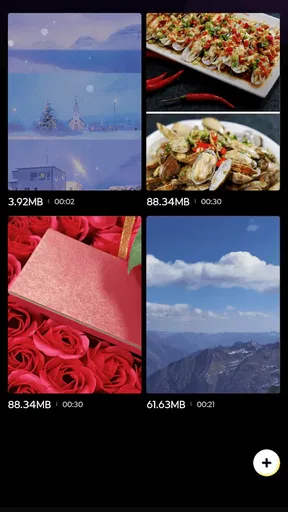
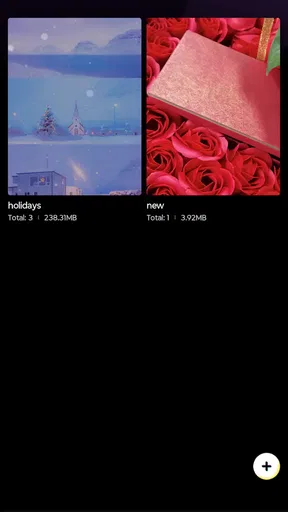
Our Review of VimFlow
 Analysis by Appyee
VimFlow is a free video editing app from MKH apps that takes a deliberately focused approach: it is built around making video organization and basic editing feel less intimidating. After spending time with it, I found its main appeal is not a long list of advanced tools, but the way it encourages a tidy, manageable workflow for people who want to turn everyday clips into something presentable without opening a complicated desktop editor.
That focus matters because many mobile editors try to serve everyone at once. They fill the screen with effects, templates, transitions, audio controls, filters, and export choices before a new user has even decided which clips belong in the project. VimFlow feels better suited to someone who wants to make sensible edits first and decorate later, if at all. The strongest reason to try it is its calm, organization-first approach to short video projects.
The app sits in the video players and editors category, carries an Everyone age rating, and is free to use. Its current version is 1.0.4, and it runs on Android 7.0 or later. That combination makes it approachable for people using older phones who may not want to install a large, demanding editor just to trim and arrange a few recordings.
Why VimFlow’s organization-first approach stands out
The most useful way to think about VimFlow is as a practical workspace for bringing order to loose video material. If I have several clips from a walk, a family gathering, a school activity, or a quick social post, the first problem is usually not a lack of visual effects. The real problem is deciding what belongs in the final sequence and getting those pieces into a sensible order. An editor that helps me stay focused on that task can be more valuable than one with hundreds of distracting options.
In everyday use, this kind of workflow changes how I begin a project. Rather than immediately experimenting with filters, I first identify the clips that carry the story, remove the obvious mistakes, and arrange the remaining moments so they make sense. VimFlow is a good match for that habit. It encourages the user to treat editing as a process of selection and structure, not just a collection of flashy adjustments.
That makes it especially comfortable for short-form work. A short travel recap, a birthday montage, a product demonstration, or a simple update for friends rarely needs a cinematic toolkit. It needs clean pacing, a beginning that makes sense, a middle that does not drag, and an ending that does not feel accidental. VimFlow’s appeal is strongest when those are the priorities.
I also appreciate that the app is not trying to make a beginner imitate a professional post-production suite. The distinction is important. A mobile editor can be powerful and still be frustrating if every ordinary action requires navigating several panels. VimFlow’s value is in reducing the mental overhead around simple projects. For someone who edits only occasionally, that can make the difference between finishing a video and abandoning it halfway through.
How I would use it from the first clip to the finished video
I would begin by collecting the clips for one clearly defined purpose instead of mixing unrelated footage. For example, if I were preparing a short record of a weekend market, I would separate the wide establishing shot, the close details, the people or activity, and the final departure shot. This small preparation step makes the editing process much easier because I am no longer judging every clip against every other clip.
Once the material is together, I would watch each piece for three things: whether it begins too early, whether it ends too late, and whether it adds something that another clip already covers. These are simple decisions, but they often improve a video more than adding effects. VimFlow is most useful when I use it to make those decisions quickly and keep the project coherent.
A practical trick is to build a rough sequence before trying to make anything polished. I would place the strongest opening clip first, follow it with the clearest explanation or action, and save the most satisfying visual moment for the close. Only after that would I worry about small adjustments. This prevents a common mobile-editing mistake: spending several minutes perfecting one clip that later gets removed because it does not fit the complete sequence.
Another helpful habit is to make a deliberately short first version. If the original material is several minutes long, I would create a compact cut that contains only the essential moments. Then I could decide whether anything genuinely important was lost. This approach is particularly effective on a phone because it reduces the number of clips I need to keep revisiting and makes the final result easier to watch.
VimFlow is also a sensible choice for people who want to edit directly after recording. A student could capture a demonstration, remove pauses and failed attempts, arrange the useful sections, and produce a clear explanation without transferring everything to a computer. A small business owner could organize a few product clips into a straightforward presentation. A parent could turn scattered phone recordings into a brief family memory without learning a professional timeline editor.
A realistic everyday project where the app makes sense
Imagine I have recorded a child’s school performance from several seats and phones. The footage is uneven: one clip starts before the performance, another includes a long pause, and a third captures the clearest view but only for a short time. I do not need elaborate visual design. I need to find the useful portions, remove dead space, arrange the views without making the sequence confusing, and create a version that relatives can watch comfortably.
That is the kind of situation in which VimFlow’s central idea feels practical. I can focus on the order of events rather than becoming lost in advanced controls. I would keep the clearest angle for the important moment, use wider footage to establish the setting, and avoid switching viewpoints so often that the result becomes distracting. The final video would benefit more from restraint than from decoration.
The same method works for a short holiday recap. I would open with the location, move through a few details that show what the day felt like, include one or two human moments, and finish with a natural closing shot. If I have too many similar clips, I would keep the one with the best movement or clearest framing instead of including all of them. This is where an organization-centered editor can quietly improve the quality of the result: it helps me make editorial choices before the project becomes cluttered.
For social sharing, the workflow is useful when speed matters more than elaborate branding. I can prepare a concise sequence while the event is still fresh, rather than waiting until I have time to learn a complex application. For private sharing, the same simplicity is valuable because the goal is usually to preserve a moment, not to create a professional production.
Where the simple workflow helps, and where it may slow me down
The main trade-off is clear. A focused editor can feel welcoming, but users who expect a full production environment may find it limiting. If your projects depend on detailed sound mixing, layered compositing, sophisticated motion graphics, precise color work, or a large library of creative effects, a more advanced alternative will probably suit you better. VimFlow should not be chosen merely because it is free if your work requires tools it does not aim to emphasize.
There is also a difference between making editing easier and making every possible edit available. Beginners sometimes discover that a simple workflow is enough for their first few projects, then want more control as their ambitions grow. That is not a failure of the app; it is a question of fit. I would use VimFlow for clear, compact edits and move to a more comprehensive editor when the project itself demands deeper control.
Another trade-off concerns the user’s own discipline. A tidy workflow does not automatically make weak footage interesting. If the clips are repetitive, poorly framed, or recorded with long stretches of nothing happening, organization alone cannot solve the problem. The app can help me remove the excess and build a better sequence, but I still need to choose material carefully and accept that some recordings are not worth keeping.
People who prefer automatic creation may also want something different. Some competing mobile editors are designed around ready-made templates and one-tap transformations. Those tools can be faster when I want a predetermined style. VimFlow is more appealing when I want to decide the order and rhythm myself. The choice comes down to whether I value personal control over instant visual treatment.
I would also plan the project before importing everything. A phone gallery can contain many near-duplicates, accidental recordings, and clips from unrelated days. Bringing all of them into an editing session makes any app feel slower to use, even a simple one. My advice is to create a small selection first, keep the project’s purpose in mind, and only then begin arranging. This is one of the most effective ways to get the benefit of VimFlow’s focused design.
How it compares with familiar mobile editing alternatives
Compared with a traditional feature-heavy mobile editor, VimFlow is better for users who want a shorter learning curve and a cleaner path from raw clips to an organized sequence. A larger editor may offer more creative freedom, but that freedom often comes with more panels, more decisions, and more opportunities to lose track of the original goal. If I only need a coherent short video, the extra machinery can become friction rather than an advantage.
Compared with automatic template-based tools, VimFlow appears more appropriate for personal pacing. Templates are convenient when the style is more important than the individual structure of the footage. They can also make unrelated clips feel artificially similar. An organization-led workflow gives me more say over what the viewer sees first, what deserves time, and when the video should end.
Compared with editing on a computer, the obvious advantage is convenience. I can work where the footage already lives and finish a modest project without changing devices. The compromise is that a phone screen is still less comfortable for detailed work than a larger display. I would not choose a lightweight mobile workflow for a long documentary or a complex multi-layer production, but for a short personal video it can be the more realistic option because I am more likely to complete it.
The app’s free price also lowers the risk of trying it for a small task. I do not have to commit money before deciding whether its style suits me. At the same time, free does not mean universally suitable. I would judge it by the kind of work I actually make, not by the absence of a charge. Someone who needs professional depth should compare capabilities first, while someone who mainly wants orderly short edits has a stronger reason to give it a chance.
Who will get the most from VimFlow
I think VimFlow is best for casual creators, families, students, travelers, and small teams that need straightforward video organization on an Android device. It is also a good starting point for a person who has avoided editing because other apps look overwhelming. The Everyone rating supports that approachable positioning, and the older minimum Android requirement means it is not restricted to only the newest phones.
It could be especially useful for someone who records frequently but finishes rarely. The solution is not always a more powerful camera or a larger effects library. Sometimes the missing piece is a repeatable process: select the useful clips, arrange them around a clear idea, remove the pauses, and stop when the message is complete. VimFlow fits that kind of routine better than an app that constantly encourages experimentation.
I would skip it if my main goal were elaborate music videos, detailed promotional campaigns, or effects-driven social content. In those cases, I would want to investigate a more advanced editor with deeper control over layers, sound, timing, and visual treatment. I would also skip it if I specifically wanted an automatic montage with almost no editorial decisions. VimFlow’s strength is helping me make the decisions, not replacing them entirely.
The app has attracted a 4.6 average from around 431 ratings and has passed 10 thousand installs, which suggests that its straightforward idea has found an audience. Those figures are encouraging, but I would still treat them as context rather than proof that every user will enjoy the workflow. The right question is whether your projects resemble the short, organized edits the app is designed to make comfortable.
My final take after using its focused approach
VimFlow succeeds when I ask it to solve a specific problem: turning a scattered group of phone videos into a clear, watchable sequence without burying me in unnecessary complexity. Its developer, MKH apps, has positioned it as a simple tool, and that simplicity is most valuable when the project is personal, short, and guided by a clear purpose.
I would recommend it to a friend who wants to edit family clips, school recordings, travel moments, or quick updates and who prefers a direct workflow over a toolbox packed with advanced options. I would tell that friend to select the footage before starting, build a rough sequence first, and judge every clip by whether it improves the story. Used that way, VimFlow turns organization into the main editing advantage rather than treating it as an afterthought.
My honest conclusion is that it is not the universal answer for mobile video editing, and it does not need to be. Its value comes from knowing what to leave out. If you want to finish simple videos with less confusion, the free app is worth trying. If you need deep creative control or automated template-driven results, another category of editor will likely be a better match.
For the right user, VimFlow is a practical companion for the moment when recording is easy but organizing the footage is not. It keeps the focus on making a usable final video, and that is often exactly what a casual creator needs.
Verdict
Strengths of VimFlow
- Fast, keyboard-focused editing for users familiar with Vim commands.
- Works well for managing and editing plain-text notes on the go.
- Customizable workflows can improve productivity for experienced users.
- Lightweight interface keeps attention on the text rather than distractions.
- Useful for developers who want a familiar editing style across devices.
Limitations of VimFlow
- The learning curve can be steep for users new to Vim-style controls.
- Touchscreen editing may feel less comfortable than using a physical keyboard.
- Some advanced desktop Vim features may be unavailable or limited.
- Command-based navigation can feel unintuitive for quick casual edits.
- The interface may appear minimal or dated compared with modern note apps.
Similar Picks in This Category
View All
Google TV
Google LLC3.9

iTunes
Apple4.7

YouTube
Google LLC3.8

MX Player
Amazon Mobile LLC4.2

CapCut - Video Editor
Bytedance Pte. Ltd.3.5

PLAYit-All in One Video Player
PLAYIT TECHNOLOGY PTE. LTD.4.5
Frequently Asked Questions
What is VimFlow, and what is it used for?
VimFlow is a productivity-focused application designed to help users organize tasks, manage personal workflows, and maintain focus while working through daily responsibilities. Its value depends on how consistently you use its planning and organization features. Before downloading, consider whether its workflow matches your preferred method, especially if you already rely on another task manager, calendar, or note-taking app.
Is VimFlow suitable for beginners who have never used a workflow or productivity system?
Yes, VimFlow can be useful for beginners, although users may need some time to understand its organization approach and configure it around their habits. The app is most effective when tasks are entered clearly, priorities are reviewed regularly, and completed work is tracked consistently. New users should expect a short learning period rather than instant results after installation.
Does VimFlow work offline, and will my information synchronize across devices?
Offline availability and synchronization can depend on the version of VimFlow, the platform being used, and the account features included with the app. If you plan to manage important tasks while traveling or without a stable connection, check the current store description and in-app settings before relying on it. Also verify how backups and device transfers are handled.
Is VimFlow free to download, or does it require a subscription or in-app purchase?
VimFlow may be available to download without an upfront charge, but some features can be restricted by premium access, subscriptions, or optional in-app purchases. Pricing and available plans may vary between Android and iOS and can change over time. Review the application store listing carefully before confirming payment, particularly if you only need basic planning tools.
What privacy and permission considerations should I know before installing VimFlow?
Before installing VimFlow, review the permissions requested by the app and read its current privacy policy. Productivity applications may process account details, task content, usage information, or synchronization data, depending on the features you enable. Avoid entering highly sensitive information unless you understand how it is stored, shared, protected, and removed from your account.
